Introduction
CostLoop is a recurring subscription and software cost tracker built for small businesses, freelancers, startup teams, and remote teams. The public site describes a manual tracking workflow where users add subscriptions themselves, store renewal and ownership details, and receive reminders before charges arrive. For teams that have outgrown scattered spreadsheets but do not want bank-connected spend software, CostLoop presents a focused middle ground.
Key Features
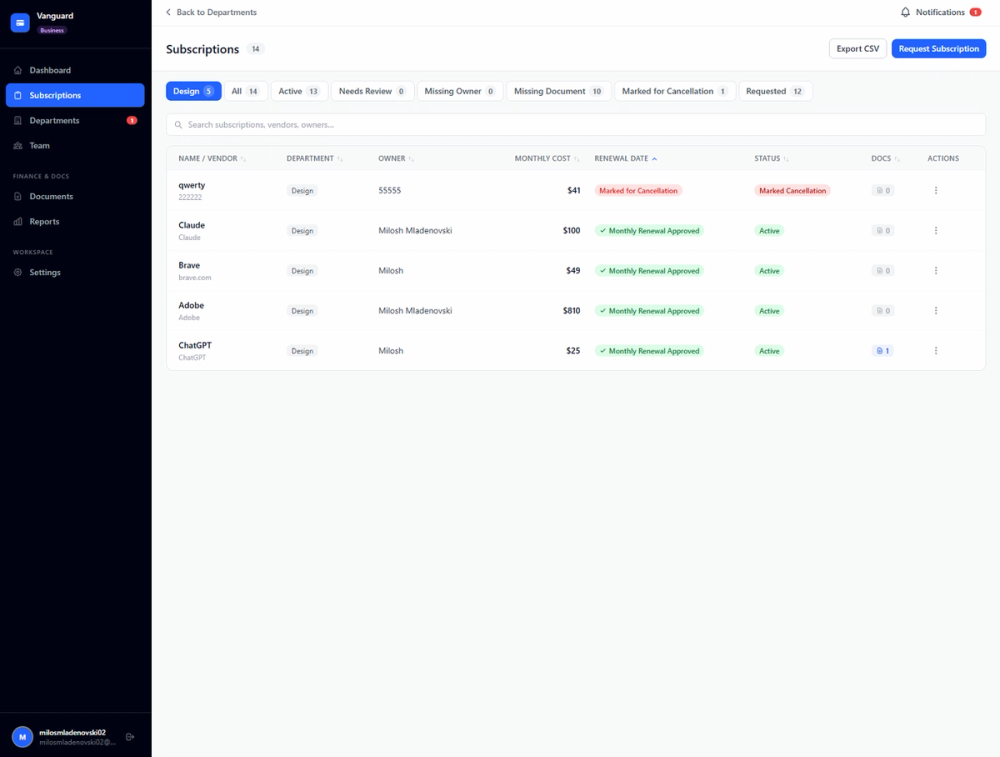
- Track subscriptions with cost, billing cycle, category, status, renewal date, owner, department, and notes.
- Manage licenses, seat counts, assigned users, expiry dates, and ownership records in the same subscription system.
- Receive renewal reminders by email, with visible lead-time options such as 7, 14, or 30 days.
- Review dashboards for monthly spend, annual forecast, budget comparison, health score, and potential savings.
- Store cancellation links, invoice links, contracts, vendor agreement URLs, receipts, and document notes with each record.
- Use CSV import, CSV export, duplicate tool detection, unused seat detection, approval workflows, and team workspaces where plan access supports them.
Use Cases
CostLoop is most relevant for businesses that pay for many tools on different billing cycles and no longer have a reliable source of truth. Its features page focuses on everyday operational problems: missed renewals, unused seats, scattered invoices, unclear owners, and cancellation links that are hard to find when a tool needs to be removed.
A freelancer might use CostLoop to list domains, design subscriptions, project management tools, accounting software, and developer services in one place. The value is not complex automation; it is remembering what exists, what it costs, when it renews, and how to cancel or document it.
For startup and small-team operations, CostLoop appears better suited to shared SaaS visibility. The Business plan mentions workspaces, team members, subscription requests, approval systems, admin notifications, and admin dashboards, which makes it useful for teams that need to assign responsibility before renewal decisions fall through the cracks.
Pricing
CostLoop publishes a Free plan, Pro plan, and Business plan on its pricing page. The Free plan is $0 per month and lets users test with 1 subscription without a credit card. Pro is listed at $9 per month for 1 user and unlocks unlimited subscriptions, health score and savings features, renewal calendar view, CSV import and export, advanced reminders, bulk actions, and priority support. Business is listed at $39 per month and adds workspaces, team members, subscription requests, approvals, instant admin email notifications, a business panel, and an admin-level dashboard. The page also mentions yearly billing with 2 months free, no annual lock-in, and cancellation from account settings.
User Experience and Support
CostLoop's user experience is intentionally manual. The site states that users do not need bank integrations, financial account access, or IT setup; they add subscriptions, costs, renewal dates, owners, and notes directly. That makes the workflow approachable, but it also means the tool is only as complete as the subscription data a user keeps updated.
Support routes are visible on the contact page, where CostLoop says email is the best way to reach the team and that replies typically come within 1 business day. The site also references billing support, refund requests, privacy requests, account deletion, data export, blog guides, email support, and priority support by plan.
Technical Details
CostLoop is presented as a web app rather than a bank-connected finance platform. The site says it does not connect to bank accounts or credit cards, does not require financial credentials, and does not require integrations to configure. Users can import existing subscription lists from CSV on supported plans and export subscription data as CSV.
The public pages also mention payments via Stripe, authentication and data storage via Supabase, and email via Resend. Other visible details include support for 10 currencies, multiple interface languages, GDPR-related controls, account deletion, data export, and privacy settings.
Pros and Cons
Pros
- The product has a clear, narrow purpose: keeping subscriptions, licenses, costs, renewals, owners, and documents visible.
- Manual tracking avoids bank or credit-card account access, which may suit teams that prefer not to connect financial accounts.
- Published pricing makes it easy to understand the difference between Free, Pro, and Business before signing up.
- Practical recordkeeping features, including cancellation links and invoice links, address problems that spreadsheets often leave unstructured.
- Team and approval features give the Business plan a stronger fit for shared SaaS management.
Cons
- Users must enter and maintain subscription information manually, so CostLoop will not automatically discover every recurring charge.
- Some of the more useful operational features, such as advanced savings views, CSV import/export, and team workspaces, are tied to paid plans.
- The site positions CostLoop as a focused tracker, not a replacement for accounting, ERP, procurement, or expense management software.
- Teams that need deep integrations with finance systems or automated spend ingestion should verify current integration coverage before adopting it.
FAQ
What is CostLoop?
CostLoop is a subscription and recurring cost tracker for small businesses, freelancers, teams, and individuals. It gives users a central place to record software subscriptions, license details, renewal dates, cancellation links, invoices, contracts, costs, and owners.
Who should consider using CostLoop?
CostLoop is a good fit to evaluate if your recurring tools are spread across emails, spreadsheets, shared drives, and individual team members. It appears especially relevant for small businesses and startups that want renewal visibility without buying an enterprise spend-management platform.
Does CostLoop automatically connect to financial accounts?
No. The site says CostLoop is fully manual and does not connect to bank accounts or require credit-card access. Users add subscriptions themselves, which supports privacy and control but requires consistent upkeep.
What features are visible on the CostLoop site?
Visible features include subscription tracking, license tracking, renewal reminders, cost dashboards, vendor and owner records, notes, action center, health score, unused seat detection, duplicate tool detection, savings opportunities, cancellation links, invoice links, contract storage, CSV import, CSV export, privacy controls, workspaces, subscription requests, and approvals.
How much does CostLoop cost?
The public pricing page lists a Free plan at $0 per month for testing with 1 subscription, Pro at $9 per month for 1 user, and Business at $39 per month. Yearly billing is shown with 2 months free, and the site says Pro can be canceled from account settings.
Is CostLoop better than using a spreadsheet?
CostLoop is designed to solve problems that spreadsheets handle poorly, such as renewal alerts, health scoring, unused seat detection, duplicate tool flags, and keeping cancellation links or invoices attached to subscription records. A spreadsheet may still work for a very small list, but CostLoop is more structured for recurring review.
What should a team verify before upgrading to Pro or Business?
A team should check which plan includes the exact features it needs, such as CSV import, advanced reminders, health score, workspaces, approvals, and admin dashboards. It should also confirm that manual tracking fits its internal process, because CostLoop is not presented as an automated bank-feed tool.
Conclusion
CostLoop is a practical subscription management app for users who want recurring software costs organized without connecting financial accounts. Its strongest public signals are clear pricing, simple setup, renewal reminders, ownership tracking, document storage, and team features for growing companies. For small businesses trying to replace a fragile subscription spreadsheet, it is a focused product worth reviewing against current workflow needs.