Introduction
ExtraBrain is a macOS desktop AI copilot focused on live interviews, meetings, lectures, and research conversations. The public site describes local-first storage, optional on-device AI powered by Gemma, bring-your-own cloud providers, and live transcription with screen-aware context. Anyone considering the app should confirm employer, school, and platform rules about assistive tools, since policies vary and the product is positioned as a thinking layer-not a substitute for demonstrating your own skills.
Key Features
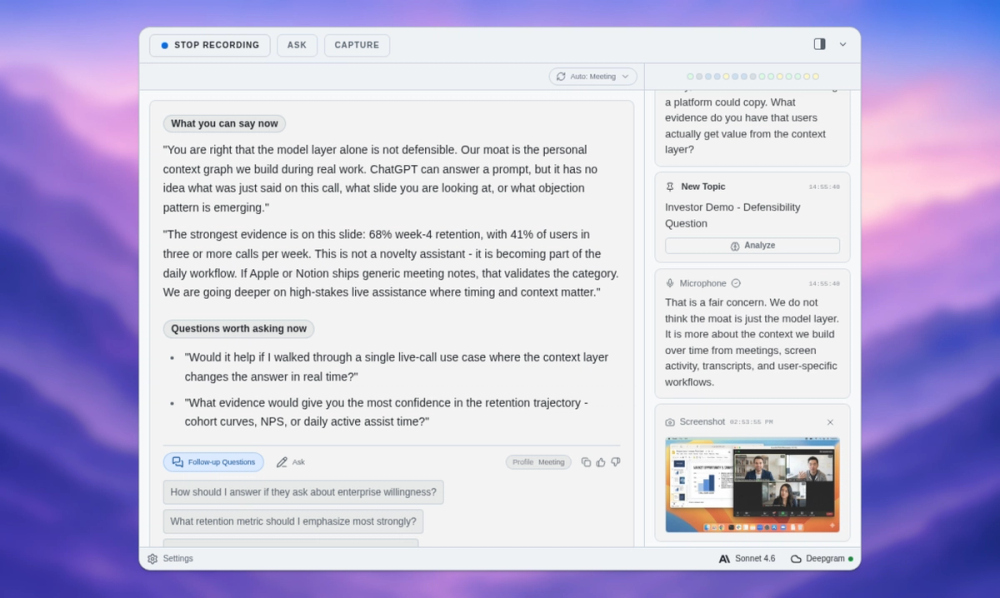
- Live transcription and session memory - Capture transcript text, prompts, screenshots, and follow-ups while a session is active; post-session summaries and saved facts are part of the workflow story.
- Structured answer support - Turn coding, system design, and behavioral prompts into clarifying questions, baselines, tradeoffs, and follow-up points.
- Gemma on-device or BYO providers - Use local Gemma 4 where installed and compatible, or connect OpenAI, Anthropic, Claude or Codex subscription modes, and custom OpenAI-compatible endpoints.
- Local Parakeet vs Deepgram - Local Parakeet transcription stays on-device; Deepgram sends audio to Deepgram when selected.
- Screen sharing awareness - Marketing states the app can stay hidden from screen sharing and recording on major video and coding-interview platforms while running on your Mac.
- Custom profiles (Pro) - Reusable prompt guidance for interview styles, meeting formats, and workflow-specific behavior controls.
Use Cases
Software engineers and candidates may use ExtraBrain during live coding, system design, and behavioral interview practice to organize prompts and edge cases from transcript-aware analysis. Meeting leads and PMs can extract decisions, risks, owners, and follow-ups from working sessions.
Students and research teams can convert dense lectures or research calls into concepts, review questions, and session history for later study. Customer research workflows on the site include highlighting pain points and quotes for roadmap notes.
Pricing
The pricing page separates the free Mac core app from Pro workflow licensing and external provider costs. Free includes core desktop use, live workflow support, local Gemma where compatible, local Parakeet, and BYO provider setup. Pro is listed from $6.99/month, $79/year, or $149 lifetime (with early-adopter code messaging on fetched copy), unlocking custom profiles, richer history and summaries, and advanced controls. Enterprise is contact-based for team rollout and policy review. Pro is an app license-not an AI credit pack-and OpenAI, Anthropic, Deepgram, and similar usage bills through accounts you connect.
User Experience and Support
Setup is described as download for Mac, grant microphone and screen permissions, pick transcription and AI providers, then rehearse before a real session. The help center documents onboarding, provider connection, live recording, screenshots, privacy controls, keyboard shortcuts, session history deletion, and Pro activation via Settings → License. Feedback and GitHub links appear in the help navigation. Windows and Linux are planned but not current public releases.
Technical Details
ExtraBrain is a native desktop app, not a bot that joins meeting rooms. Data flow depends on configuration: settings, API keys, local session history, and Parakeet data stay on the Mac; cloud LLM requests send selected text, transcript context, and screenshot-derived context to the provider you choose. Compatibility lists include Zoom, Google Meet, Microsoft Teams, Webex, Slack Huddles, Discord, and several coding-interview environments. Remote settings tab is noted as development-only and not a public feature.
Pros and Cons
Pros
- Clear split between free app access and provider billing you control.
- Local-first path with Gemma and Parakeet for users who want on-device processing.
- Broad interview and meeting scenario coverage with explicit policy reminders.
- Detailed public documentation for permissions, providers, and troubleshooting.
Cons
- macOS-only today; other platforms are not shipped yet.
- Full privacy depends on avoiding cloud transcription and cloud LLMs-mixed setups send data externally.
- Pro and provider costs add up for heavy daily use.
- Ethical and policy constraints mean the tool is inappropriate where live AI assistance is prohibited.
FAQ
What is ExtraBrain and what problem does it appear to solve?
ExtraBrain is a live AI interview and meeting copilot for Mac that organizes transcripts, screen context, and prompts into structured notes and answer outlines during fast-moving conversations. It appears aimed at people who need real-time support capturing context without manually typing everything.
Who is ExtraBrain best suited for?
The site names engineers, candidates, students, founders, meeting leads, PMs, and research teams-especially anyone running repeated high-stakes live sessions on Mac who accepts responsibility for platform and employer rules.
Does ExtraBrain send all data to ExtraBrain's servers?
Public help copy states ExtraBrain stores settings, keys, local history, and local Parakeet data on your Mac. Cloud LLM and Deepgram paths send the content required for those services to the providers you select-not a blanket "everything to ExtraBrain cloud" model.
What does ExtraBrain Pro add beyond Free?
Pro unlocks custom profiles, profile workflow controls (such as window behavior and screenshot-triggered analysis where enabled), richer follow-through via advanced history and summaries, and in-app license management. It does not replace external AI or transcription provider fees.
How much does ExtraBrain cost compared to model usage?
The app can be free; Pro is priced monthly, yearly, or lifetime on the pricing page. Local Gemma 4 has no external model fees when used locally; OpenAI, Anthropic, Deepgram, and similar services bill under your own accounts.
Can ExtraBrain run on Windows or join my video call as a participant?
No for both in the current public positioning: macOS is the supported platform today, and the product is a desktop copilot on your machine-not a meeting bot joining the room.
Where should users look for setup and permission issues?
The help center troubleshooting section covers microphone, screen recording, system audio, API validation, Deepgram setup, screenshots, and session deletion-start there before assuming an app bug.
Conclusion
ExtraBrain targets Mac users who want a local-first, provider-flexible copilot for interviews and meetings, with optional Pro workflow depth and transparent separation from third-party AI bills. Review pricing, help documentation, and your own organization's rules before using it in graded, hiring, or compliance-sensitive settings.