Introduction
SVG Spark is an SVG toolkit for converting SVG files or code into PNG, JPG, GIF, and WebP outputs directly in the browser. The public page also presents AI-assisted SVG generation, an SVG code editor and fixer, SVG-to-WebP optimization, and a free SVG assets library. It appears well suited for designers, developers, and content teams that need quick vector-to-image conversion plus light SVG editing and generation tools.
Key Features
- Client-side SVG conversion for PNG, JPG, GIF, and WebP outputs.
- Drag-and-drop upload or direct SVG code paste to start a conversion.
- Output settings for dimensions and transparent, white, or custom backgrounds.
- Real-time preview before downloading the converted file.
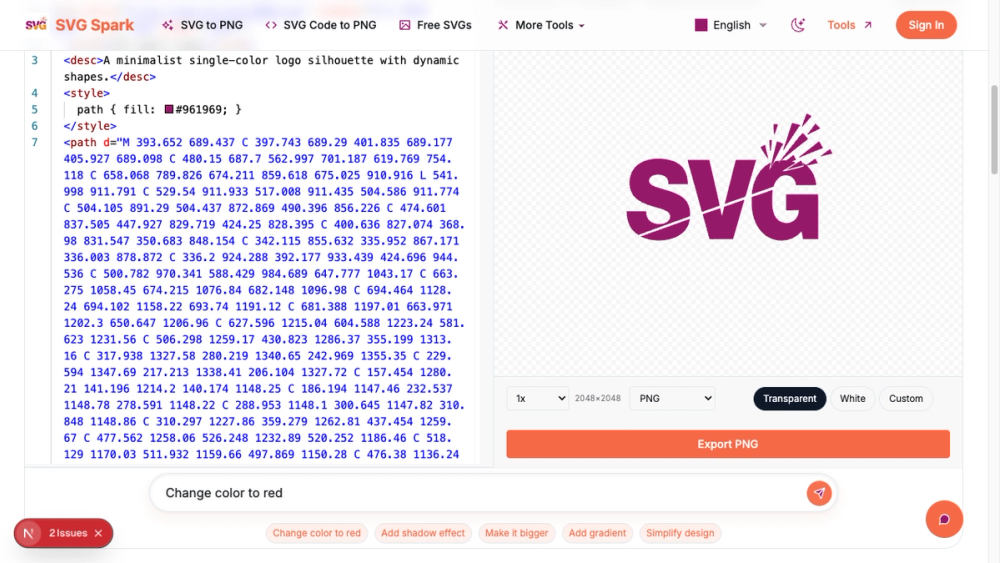
- SVG Code Editor and AI Fixer for modifying colors, shapes, and styles or repairing broken SVGs.
- AI-powered SVG generation for custom icons, backgrounds, logos, and vector art, plus an asset library with 10,000+ free icons.
Use Cases
SVG Spark is useful for anyone who needs to turn SVG logos, icons, or illustrations into raster formats for websites, presentations, documentation, or social posts. The page emphasizes one-click conversion, high-resolution downloads, batch processing, and custom output settings, which are practical for design handoff and asset preparation.
Developers may find value in the code-focused tools. The site mentions a built-in syntax-highlighted code editor, raw SVG code paste, and AI-based modifications to colors, shapes, and styles. That makes the product relevant when an SVG is almost right but needs cleanup, resizing, background changes, or small code adjustments.
The AI generation and asset library make SVG Spark broader than a simple converter. Users can generate icons or vector art from text prompts, use downloadable SVG templates, or pull from the free icon library. A careful user should still verify licensing, output rights, and whether AI-generated assets fit their brand or production standards.
Pricing
SVG Spark shows free signals, including a Free SVG Assets Library with 10,000+ icons and public conversion tools. However, the site does not show a full pricing table, subscription tiers, generation credits, account limits, or paid feature boundaries. Users should verify whether AI generation, batch conversion, commercial asset use, or advanced export options require sign-in or payment before relying on the tool for ongoing work.
User Experience and Support
The conversion path is presented in four simple steps: upload or paste SVG, customize output, preview in real time, and convert and download. The page also includes tool navigation for SVG templates, SVG Code Editor and AI Fixer, SVG to WebP Optimizer, Free SVG Assets Library, AI GIF Generator, and SVG Code to PNG.
Support information is limited on the visible site. The page mentions global language support, Privacy Policy, and Terms of Service, but no dedicated help center, contact email, documentation, or live support route is visible. For occasional conversions that may be acceptable, but teams using SVG Spark in production settings should review the live site's terms and support options.
Technical Details
The most important technical detail is client-side conversion. The public page says files never leave the browser, which matters for users working with brand assets or unfinished design files. It also supports direct SVG code input, file upload, batch conversion, output dimensions, background choices, real-time previews, and multiple raster output formats.
SVG Spark includes vector-graphics tools for AI SVG generation, animation references, WebP optimization, and code editing. Teams with automated asset pipelines should check whether SVG Spark offers an API, plugin, command-line tool, Figma integration, cloud storage integration, or team workspace.
Pros and Cons
Pros
- Handles common SVG conversion needs directly in the browser.
- Client-side processing is useful for users who prefer not to upload files.
- Output controls cover dimensions, preview, and background choices.
- Built-in SVG code editing and AI fixing can help with broken or imperfect files.
- AI generation and the free SVG assets library make the product broader than a basic converter.
Cons
- Pricing, account limits, and AI generation limits are not clearly visible on the site.
- Support routes are not clearly shown beyond policy pages and language support.
- No API, plugin, or automation details are visible for developer pipelines.
- AI-generated SVGs may still need manual review for brand fit, accessibility, and code quality.
- Users should verify licensing before using downloaded or generated assets commercially.
FAQ
What is SVG Spark?
SVG Spark is an online SVG toolkit that converts SVG files or code into PNG, JPG, GIF, and WebP outputs. The site also presents AI SVG generation, code editing, WebP optimization, and a free SVG asset library.
Who is SVG Spark for?
It is for designers, developers, marketers, and creators who work with SVG logos, icons, backgrounds, or vector artwork. It is especially relevant when users need quick browser-based conversion or small SVG adjustments.
Does SVG Spark upload files to a server?
The public page says conversion is client-side and that files never leave the browser. Users handling sensitive brand assets should still review current privacy terms and test the workflow directly.
What output formats does SVG Spark support?
The page says users can save SVG as PNG, JPG, GIF, or WebP. It also highlights SVG to PNG conversion and SVG to WebP optimization.
Can SVG Spark edit SVG code?
Yes. The site mentions a built-in code editor and an SVG Code Editor and AI Fixer for modifying colors, shapes, and styles or fixing broken SVGs.
Does SVG Spark include AI generation?
Yes. The public page says SVG Spark includes AI-powered SVG generation for custom icons, backgrounds, logos, and vector art from text prompts.
Is SVG Spark free?
The site shows free assets and public conversion tools, but it does not show a complete pricing table or AI usage limits. Users should verify whether advanced features, sign-in, or generation usage require payment.
What should teams verify before using SVG Spark for production assets?
Teams should check asset licensing, commercial-use rights, export quality, AI generation limits, privacy terms, support options, and whether the tool offers automation or integrations. These details matter for brand systems and repeat design workflows.
Conclusion
SVG Spark combines SVG conversion, code editing, AI fixing, AI generation, WebP optimization, and a free asset library in one browser-based toolkit. Its strongest public signals are client-side conversion, flexible output settings, real-time preview, AI-assisted SVG tools, and developer-friendly code input. The main details to verify are pricing, commercial usage rights, AI limits, support routes, and whether the product fits automated production workflows.